PyTorch
PyTorch is an open-source machine learning library based on the Torch library, used for applications such as computer vision and natural language processing, primarily developed by Facebook’s AI Research lab. It is free and open-source software released under the Modified BSD license.
Useful Links:
Model visualization
Model Explorer provides a web-based interface for visualizing and debugging PyTorch models. You can use the following code to visualize any PyTorch model.
# pip install ai-edge-model-explorer
import model_explorer
import torch
import torchvision

# Prepare a PyTorch model and its inputs.
model = torchvision.models.mobilenet_v2().eval()
inputs = (torch.rand([1, 3, 224, 224]),)
ep = torch.export.export(model, inputs)

# Visualize.
model_explorer.visualize_pytorch('mobilenet', exported_program=ep)
torch.compile
torch.compile is a new feature in PyTorch that allows users to compile their models for faster training and inference. In practice, it can speed up model inference at least 30%.
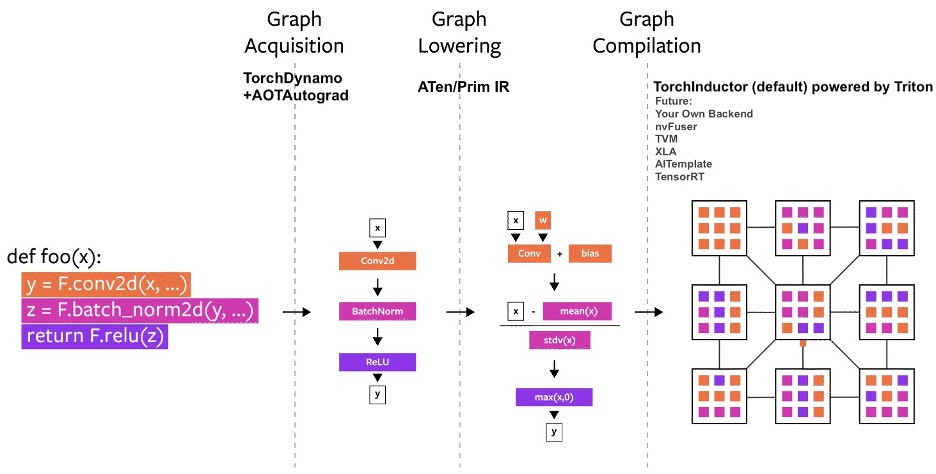
torch.compile workflow
The process begins with torch.compile taking a PyTorch model as input. It then utilizes TorchDynamo and AOTAutograd to generate execution graphs for both the forward and backward passes. Next, each operator within the graph is mapped to a manually optimized operator from either ATen or Prim IR. Finally, TorchInductor compiles the generated graphs and produces execution Triton code for the GPU and C++/OpenMP code for the CPU.
Use torch.compile is simple. Just wrap your model with torch.compile and it will automatically compile your model for faster training and inference.
# option 1: using torch.compile
import torch
mod = MyModule()
opt_mod = torch.compile(mod)

# option 2: using @torch.compile warp your code
t1 = torch.randn(10, 10)
t2 = torch.randn(10, 10)

@torch.compile
def opt_foo2(x, y):
    a = torch.sin(x)
    b = torch.cos(y)
    return a + b
print(opt_foo2(t1, t2))
torch.compile has integrated with Torch-TensorRT and enables users to compile their models with TensorRT backend for faster inference.
# pip install torch-tensorrt
import torch
import timeit
import torch_tensorrt

model = MyModel().eval().cuda() # define your model here
x = torch.randn((1, 3, 224, 224)).cuda() # define what the inputs to the model will look like

optimized_model = torch.compile(model, backend="tensorrt")
optimized_model(x) # compiled on first run

optimized_model(x) # this will be fast!

# Tesla V100 32GB
# >>> timeit.timeit('model(x)', number=10, globals=globals())
# 0.10089640901423991
# >>> timeit.timeit('optimized_model(x)', number=10, globals=globals())
# 0.04496749211102724
PyTorch profiling
Use PyTorch Profile
PyTorch Profile provides a fine-grained view of the performance of your PyTorch code. It can help you identify bottlenecks (e.g., slow operations) and optimize your code accordingly.
import torch
import torchvision.models as models
from torch.profiler import profile, record_function, ProfilerActivity

model = models.resnet18()
inputs = torch.randn(5, 3, 224, 224)

# ProfilerActivity.CPU, ProfilerActivity.CUDA
with profile(activities=[ProfilerActivity.CPU],
        profile_memory=True, record_shapes=True) as prof:
    model(inputs)

# self_cpu_time_total, self_cuda_time_total, self_cpu_memory_usage
print(prof.key_averages().table(sort_by="self_cpu_memory_usage", row_limit=10))
You can also use pytorch_benchmark to profile the whole inference workload.
# pip install pytorch-benchmark
from pytorch_benchmark import benchmark

model = models.resnet18().to("cuda")
inputs = torch.randn(8, 3, 224, 224).to("cuda")

results = benchmark(model, inputs, num_runs=100)
Sample results:
{'machine_info': {'system': {'system': 'Linux',
'node': 'ubuntu20',
'release': '5.4.0-200-generic'},
'cpu': {'model': 'Intel(R) Xeon(R) Gold 6248R CPU @ 3.00GHz',
'architecture': 'x86_64',
'cores': {'physical': 9, 'total': 18},
'frequency': '0.00 GHz'},
'memory': {'total': '57.15 GB', 'used': '9.17 GB', 'available': '47.27 GB'},
'gpus': [{'name': 'Tesla V100S-PCIE-32GB', 'memory': '32768.0 MB'},
{'name': 'Tesla V100S-PCIE-32GB', 'memory': '32768.0 MB'}]},
'device': 'cuda',
'params': 11689512,
'flops': 1822177768,
'timing': {'batch_size_1': {'on_device_inference': {'metrics': {'batches_per_second_mean': -0.3533214991294893,
    'batches_per_second_std': 0.024314445753960502,
    'batches_per_second_min': -0.3696649900451516,
    'batches_per_second_max': -0.1583176335697835,
    'seconds_per_batch_mean': -2.8545052862167357,
    'seconds_per_batch_std': 0.36834380372350745,
    'seconds_per_batch_min': -6.316415786743164,
    'seconds_per_batch_max': -2.7051520347595215},
    'human_readable': {'batches_per_second': '-0.35 +/- 0.02 [-0.37, -0.16]',
    'batch_latency': '-2854505.286 us +/- 368.344 ms [-6316415.787 us, -2705152.035 us]'}},
'cpu_to_gpu': {'metrics': {'batches_per_second_mean': 3642.634925121181,
    'batches_per_second_std': 290.7311815052623,
...
'max_inference_bytes': 165828608,
'post_inference_bytes': 108468224,
'pre_inference': '103.44 MB',
'max_inference': '158.15 MB',
'post_inference': '103.44 MB'}}}
Use NVIDIA Nsight Systems
NVIDIA Nsight Systems provides a timeline view of your PyTorch code, allowing you to visualize the performance of your model and identify bottlenecks.
# test_nsys.py
import torch
import torchvision.models as models
#from torch.profiler import profile, record_function, ProfilerActivity

torch.cuda.nvtx.range_push("model")
model = models.resnet18(pretrained=True).cuda()
torch.cuda.nvtx.range_pop()

torch.cuda.nvtx.range_push("inputs")
inputs = torch.randn(1, 3, 224, 224).cuda()
torch.cuda.nvtx.range_pop()
model.eval()

torch.cuda.nvtx.range_push("forward")
with torch.no_grad():
    for i in range(30):
        torch.cuda.nvtx.range_push(f"iteration {i}")
        model(inputs)
        torch.cuda.nvtx.range_pop()

torch.cuda.nvtx.range_pop()
Execute the code with nsys:
nsys profile -w true -t cuda,nvtx,osrt,cudnn,cublas -s none -o nsight_report -f true -x true python test_nsys.py
You can view the results in the NVIDIA Nsight Systems GUI.

Nsys example
As illustrated in the figure above, the first inference iteration is slow due to the warmup phase (e.g., allocating GPU resource via cudaFree). The subsequent iterations are faster.
Use PyTorch Lightning
PyTorch Lightning provides a lightweight PyTorch wrapper to help researchers and practitioners streamline their code and make it more readable and maintainable.
Define the training workflow. Here’s a toy example:
# main.py
# ! pip install torchvision
import torch, torch.nn as nn, torch.utils.data as data, torchvision as tv, torch.nn.functional as F
import lightning as L
from lightning import loggers

# --------------------------------
# Step 1: Define a LightningModule
# --------------------------------
# A LightningModule (nn.Module subclass) defines a full *system*
# (ie: an LLM, diffusion model, autoencoder, or simple image classifier).


class LitAutoEncoder(L.LightningModule):
    def __init__(self):
        super().__init__()
        self.encoder = nn.Sequential(nn.Linear(28 * 28, 128), nn.ReLU(), nn.Linear(128, 3))
        self.decoder = nn.Sequential(nn.Linear(3, 128), nn.ReLU(), nn.Linear(128, 28 * 28))

    def forward(self, x):
        # in lightning, forward defines the prediction/inference actions
        embedding = self.encoder(x)
        return embedding

    def training_step(self, batch, batch_idx):
        # training_step defines the train loop. It is independent of forward
        x, _ = batch
        x = x.view(x.size(0), -1)
        z = self.encoder(x)
        x_hat = self.decoder(z)
        loss = F.mse_loss(x_hat, x)
        self.log("train_loss", loss)
        return loss

    def validation_step(self, batch, batch_idx):
        # this is the validation loop
        x, _ = batch
        x = x.view(x.size(0), -1)
        z = self.encoder(x)
        x_hat = self.decoder(z)
        val_loss = F.mse_loss(x_hat, x)
        self.log("val_loss", val_loss)

    def test_step(self, batch, batch_idx):
        # this is the test loop
        x, _ = batch
        x = x.view(x.size(0), -1)
        z = self.encoder(x)
        x_hat = self.decoder(z)
        test_loss = F.mse_loss(x_hat, x)
        self.log("test_loss", test_loss)

    def configure_optimizers(self):
        optimizer = torch.optim.Adam(self.parameters(), lr=1e-3)
        return optimizer


# -------------------
# Step 2: Define data
# -------------------
dataset = tv.datasets.MNIST(".", download=True, transform=tv.transforms.ToTensor())
train, val = data.random_split(dataset, [55000, 5000])

# -------------------
# Step 3: Train
# -------------------
autoencoder = LitAutoEncoder()
trainer = L.Trainer(accelerator="gpu", devices=8, logger=TensorBoardLogger("logs/"))
# trainer.test(model, dataloaders=DataLoader(test_set))
trainer.fit(autoencoder, data.DataLoader(train), data.DataLoader(val))
Run the model on your terminal
pip install torchvision
python main.py
Export to torchscript (JIT)
# torchscript
autoencoder = LitAutoEncoder()
torch.jit.save(autoencoder.to_torchscript(), "model.pt")
Export to ONNX
# onnx
with tempfile.NamedTemporaryFile(suffix=".onnx", delete=False) as tmpfile:
    autoencoder = LitAutoEncoder()
    input_sample = torch.randn((1, 64))
    autoencoder.to_onnx(tmpfile.name, input_sample, export_params=True)
    os.path.isfile(tmpfile.name)
Develop a reusable datamodule
import lightning as L
from torch.utils.data import random_split, DataLoader

# Note - you must have torchvision installed for this example
from torchvision.datasets import MNIST
from torchvision import transforms


class MNISTDataModule(L.LightningDataModule):
    def __init__(self, data_dir: str = "./"):
        super().__init__()
        self.data_dir = data_dir
        self.transform = transforms.Compose([transforms.ToTensor(), transforms.Normalize((0.1307,), (0.3081,))])

    def prepare_data(self):
        # download
        MNIST(self.data_dir, train=True, download=True)
        MNIST(self.data_dir, train=False, download=True)

    def setup(self, stage: str):
        # Assign train/val datasets for use in dataloaders
        if stage == "fit":
            mnist_full = MNIST(self.data_dir, train=True, transform=self.transform)
            self.mnist_train, self.mnist_val = random_split(
                mnist_full, [55000, 5000], generator=torch.Generator().manual_seed(42)
            )

        # Assign test dataset for use in dataloader(s)
        if stage == "test":
            self.mnist_test = MNIST(self.data_dir, train=False, transform=self.transform)

        if stage == "predict":
            self.mnist_predict = MNIST(self.data_dir, train=False, transform=self.transform)

    def train_dataloader(self):
        return DataLoader(self.mnist_train, batch_size=32)

    def val_dataloader(self):
        return DataLoader(self.mnist_val, batch_size=32)

    def test_dataloader(self):
        return DataLoader(self.mnist_test, batch_size=32)

    def predict_dataloader(self):
        return DataLoader(self.mnist_predict, batch_size=32)
Use the datamodule
dm = MNISTDataModule()
model = Model()
trainer.fit(model, datamodule=dm)
trainer.test(datamodule=dm)
trainer.validate(datamodule=dm)
trainer.predict(datamodule=dm)
Find training loop bottlenecks
trainer = Trainer(profiler="simple")
FIT Profiler Report

-------------------------------------------------------------------------------------------
|  Action                                          |  Mean duration (s) |  Total time (s) |
-------------------------------------------------------------------------------------------
|  [LightningModule]BoringModel.prepare_data       |  10.0001           |  20.00          |
|  run_training_epoch                              |  6.1558            |  6.1558         |
|  run_training_batch                              |  0.0022506         |  0.015754       |
|  [LightningModule]BoringModel.optimizer_step     |  0.0017477         |  0.012234       |
|  [LightningModule]BoringModel.val_dataloader     |  0.00024388        |  0.00024388     |
|  on_train_batch_start                            |  0.00014637        |  0.0010246      |
|  [LightningModule]BoringModel.teardown           |  2.15e-06          |  2.15e-06       |
|  [LightningModule]BoringModel.on_train_start     |  1.644e-06         |  1.644e-06      |
|  [LightningModule]BoringModel.on_train_end       |  1.516e-06         |  1.516e-06      |
|  [LightningModule]BoringModel.on_fit_end         |  1.426e-06         |  1.426e-06      |
|  [LightningModule]BoringModel.setup              |  1.403e-06         |  1.403e-06      |
|  [LightningModule]BoringModel.on_fit_start       |  1.226e-06         |  1.226e-06      |
-------------------------------------------------------------------------------------------